GEO2Enrichr can be used via either this website or a browser extension.
GEO data is saved as Simple Omnibus Format in Text (SOFT) files. These are just tab-separated, plain text files of raw expression data. This website can be used to upload custom "SOFT-like" files. The file should be a tab-separated .txt file. The first row contains the column names; the second row contains 0s and 1s, indicating whether the column is control or condition, respectively. Every subsequent row contains a gene symbol and some expression data in columns. Here is an example:
            a	b	c	d
            0	0	1	1
        PSME1	11.0434	11.2627	10.8087	11.4478
        CISD1	10.2767	9.8619	9.8398	9.735
        VDAC1	12.5042	12.4814	12.5263	12.3535
        SORBS3	6.4963	6.4695	5.823	6.3342
        SPDEF	8.8047	8.7521	9.012	9.0021
        ATF1	7.2121	7.0669	7.0076	7.2567
        SPAG4	4.858	4.6256	4.9841	4.3425
        E2F2	4.8262	4.9155	4.5118	4.6509
        RHEB	12.4814	12.047	12.5944	12.1776
        ...
You can use the web form linked to above to upload your file, attach any relevant metadata, and submit it to our servers for processing. After the processing is finished, GEO2Enrichr will redirect you to your results page.
GEO2Enrichr's two browser extensions function the same in both Chrome and Firefox; this tutorial is for both.
Each extension works by embedding additional functionality into relevant GEO pages that you visit. For example, after installing an extension, visiting the page GDS5077 and clicking "Compare 2 sets of samples", you should see a new hypertext that says "Extract knowledge with GEO2Enrichr" (Fig. 1).
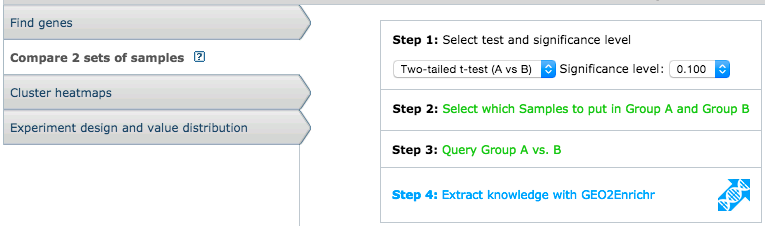
Fig. 1 Screenshot that shows how GEO2Enrichr adds an additional step to the GEO datasets pipeline.
If you immediately click that hypertext, you will receive a warning: "Please select 2 or more control samples." This warning occurs because GEO2Enrichr needs you to specify the datasets that you would like to download, process, and analyze. Click "Select which Samples to put in Group A and Group B" and select two groups of samples: control samples on the left and treatment/condition samples on the right. In this example, GSM1071454 and GSM1071455 are the control samples and GSM1071457 and GSM1071457 are the treatment or condition samples (Fig. 2). It is important that the control samples are selected on the left and treatment samples are selected on the right because this information is used to determine the up-regulated and down-regulated genes direction.
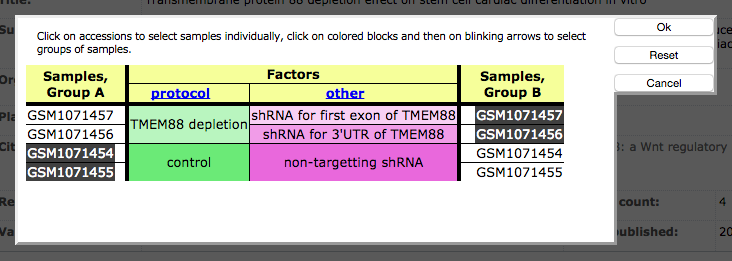
Fig. 2 Screenshot to show how to identify the control and treatment/condition samples on the GEO datasets site.
Now you can open GEO2Enrichr. Click Extract knowledge with GEO2Enrichr to see the application"s main modal dialog box (Fig. 3).
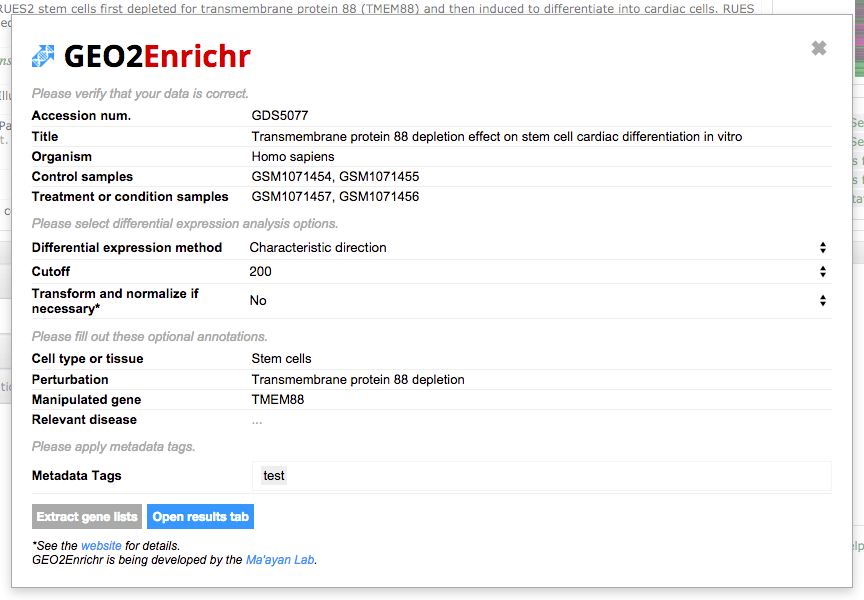
Fig. 3 Screenshot of the GEO2Enrichr main modal dialog box.
The extension then screen scrapes the GEO webpage for relevant data. Please confirm that the accession number, platform, organism, and sample files are all correct and report any inaccuracies. If you need to change the sample selection, you must close GEO2Enrichr and re-select the samples via the GEO dataset interactive interface (Fig. 2).
Please fill in any metadata about the experiment, such as cell type or tissue, perturbation, and manipulated gene (if relevant). This metadata will be used to annotate your downloadable filenames and a description that uses this information will be sent to Enrichr.
Finally, click the Extract gene lists button to submit your data selection to GEO2Enrichr for data processing. Depending on the size of SOFT file and the number of samples you selected, this can take anywhere from a few seconds to a minute or two. Once the processing is complete, you will see a new button that says "Open results tab". Clicking this button will open a results page (Fig 4).
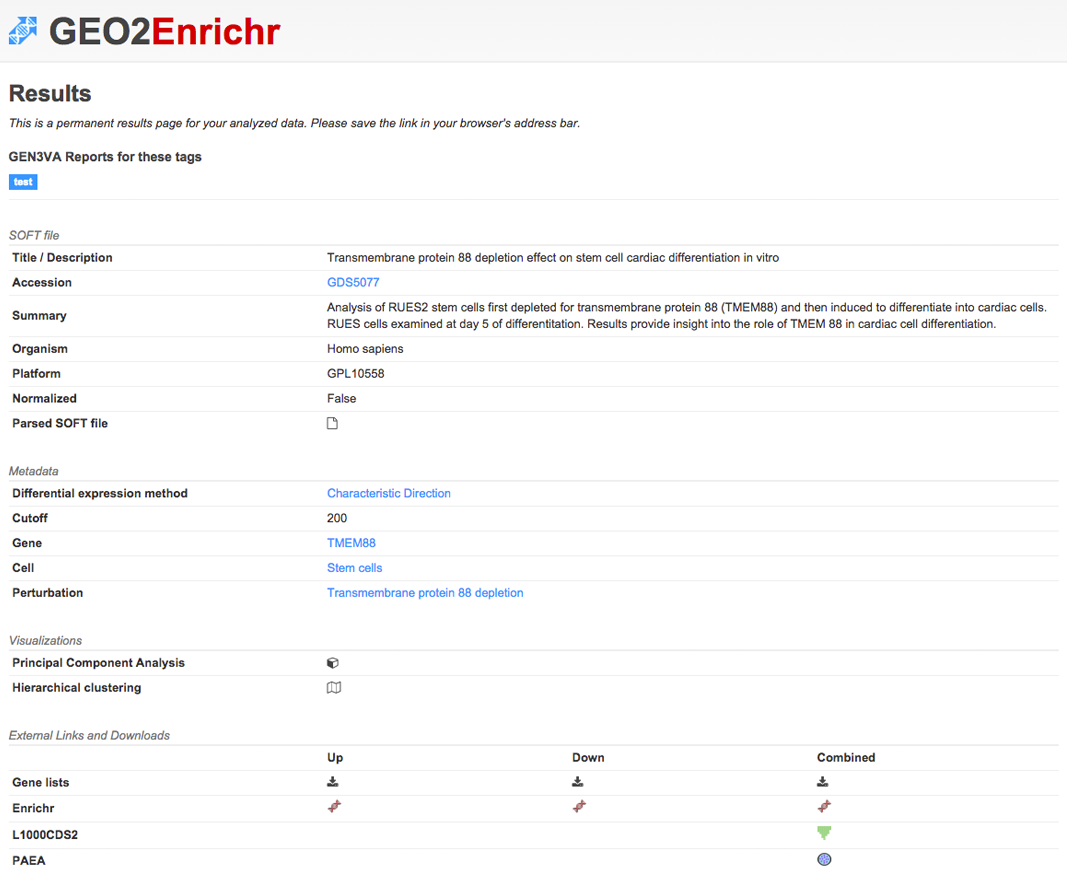
Fig. 4 Screenshot of a results page.
These results pages are permanent. You can reference a previous analysis at any time via the page"s link.
A tag is a plain text term that you can use to associate multiple signatures from different studies. These tags are non-hierarchical keywords assigned to a gene signature. In social media, the equivalent idea is a "hashtag", which is a tag preceded by a "#" or hash symbol. These tags enable the creation of collections of gene signatures around common themes. A gene signature can have multiple tags.
Tags can be added to signatures extracted from either GEO (Fig. 5) or custom datasets. Tags are case insensitive and space-delimited, but capitalization can be used for visual clarity.

Fig. 5 Screenshot that shows how three tags applied to a GEO dataset before processing.
Any tags associated with an extracted gene signature will appear on the signature's results page. Clicking on the tag will direct you to GEN3VA, another Ma'ayan Lab web tool that performs aggregated analysis of gene signatures collected via tags around common biological themes.
When GEO2Enrichr was first published, we supported the browser extension in both Chrome and Firefox. Unfortunately, do to changes in Firefox add-on technology, we will not support Firefox past Q1 of 2016. GEO2Enrichr is primarily the efforts of a single developer, and maintaining a full-stack web application in addition to two completely separate browser extensions is not feasible at this time. Hopefully, users who prefer Firefox over Chrome will be comfortable using Chrome to perform differential expression analysis on GEO pages.
